What Is a Node in a Network: A Complete Beginner's Guide
A node is any device or logical endpoint that can create, receive, send, store, or forward data across a network. In computer networking, examples include computers, printers, modems, bridges, and switches, while graph-based systems use nodes to represent entities and the relationships between them.
Your phone refreshes a weather widget while your laptop streams a lecture and a smart speaker buffers a song. You don't see the packets moving through radio waves, cables, switches, routers, and fiber, but each device is taking part in a quiet, continuous conversation.
That everyday scene leads to a useful question: what is a node in a network, exactly? The answer changes slightly depending on whether you're looking at a home Wi-Fi setup, a data center, a social graph, or a blockchain. The underlying idea stays stable, though. A node is a participant with an identity, a role, and the ability to exchange information.
Table of Contents
- A World Built on Tiny Conversations
- What Makes Something a Node
- The Main Types of Nodes You Will Meet
- How Nodes Reach Agreement in Blockchain Networks
- How Nodes Connect Through Topologies
- Security and Privacy Considerations for Node Operators
- Running or Contributing a Node in Practice
- Bringing It All Together and Choosing Your Path
A World Built on Tiny Conversations
Your phone doesn't fetch weather data from nowhere. It sends a request, receives a response, and may store part of that information locally. Your laptop sends video requests to a service, receives a stream, and passes the resulting data to an application that displays it. The smart speaker does something similar while it receives audio in pieces and temporarily holds enough data to play smoothly.
Each exchange can involve several participants. A device may create the original request, a network switch may forward the traffic, a router may choose the next path, and a server may send the requested content. IBM's networking overview describes nodes as basic connection points where data can be created, sent, received, stored, or forwarded. That broad definition is useful because it works for both simple home networks and large communication systems.

One word, several jobs
A node isn't always the device you're actively using. Your laptop can be an end node when it requests a web page. Your home router is also a node, but it usually acts as an intermediary that moves traffic between networks. A server can receive requests, process data, store files, and return responses.
The same abstraction appears outside traditional networking. In graph theory, nodes represent entities and edges represent relationships between them. A node might stand for a person in a social network, an organization in a business relationship map, or a variable in a scientific model. The physical form changes, but the idea of connected participants remains.
Distributed networking and packet switching helped establish the modern meaning of a node. Instead of treating communication as a conversation with one central machine, packet-switched systems required many endpoints and intermediate devices to cooperate. Today's Internet applies that model across hosts, routers, and other connected equipment.
A useful mental model: A node is any participant that can take part in a network conversation. It may speak, listen, remember, or help pass the message along.
What Makes Something a Node
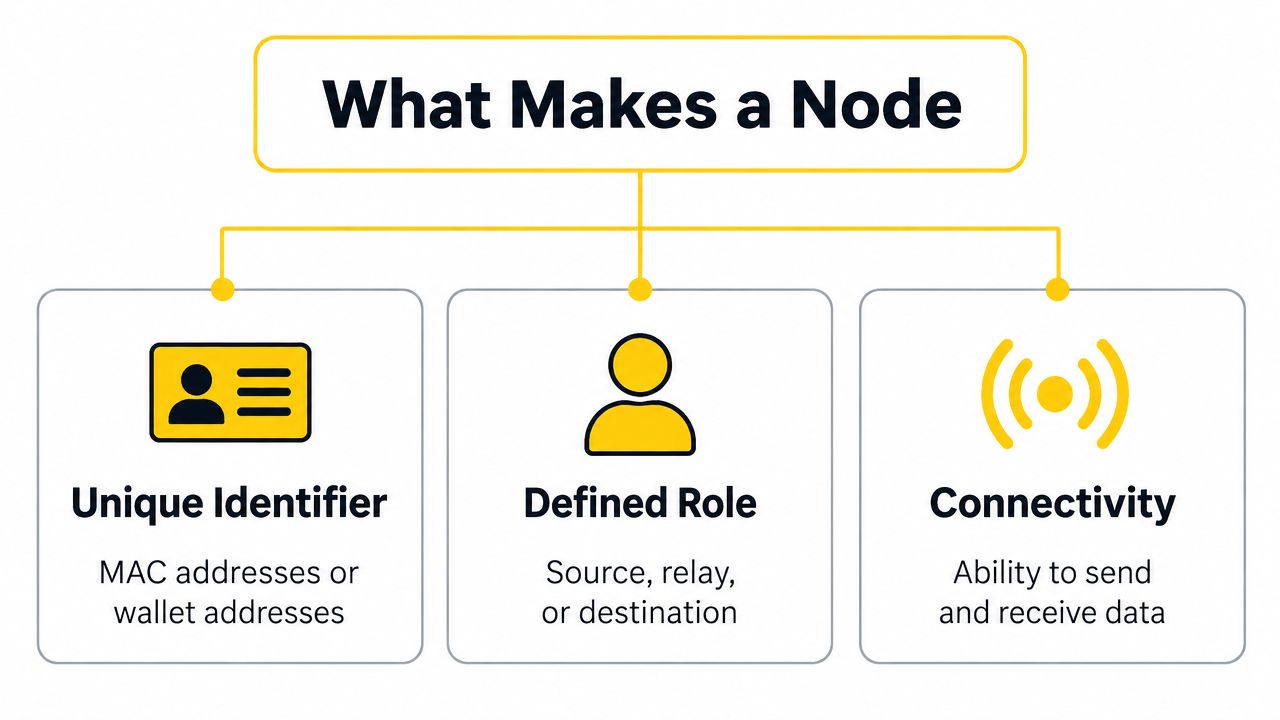
A device becomes meaningful as a node when other participants can identify it, understand its role, and exchange data with it. Hardware matters, but the network behavior matters more. A physical computer can host several logical nodes, while a software process can act as a node without being a separate box.
An identity others can use
Think of a node's identifier as a postal address. Other participants need some way to distinguish the intended recipient from every other participant. In ordinary computer networks, that identifier may be an IP address or a MAC address, as IBM explains in its networking material.
Blockchain systems use different identifiers for different purposes. A wallet address identifies where transactions are directed, while peer software also needs network information that lets it discover and communicate with other peers. The important point is that an identifier gives data a destination or source that the network can recognize.
A role in the conversation
A node also has a job. It may be the source of a request, the destination of a response, or a relay that forwards traffic. A router doesn't usually create the application data that passes through it, but it still participates by choosing where packets go next.
Roles can change. A laptop can download a file as a client, serve a shared folder to another computer, and forward traffic if it has been configured for that purpose. In a blockchain, a peer may validate data, relay transactions, maintain a local ledger, or perform consensus work.
The capability to exchange data
Finally, a node needs the relevant capabilities. It may create, receive, store, or forward information, depending on its design and configuration. A printer can receive print jobs, a database server can store records and answer queries, and a switch can forward frames between connected devices.
Nodes can be physical, virtual, or logical. A virtual machine, container, software-defined network endpoint, or blockchain process can all function as a node when they participate in communication. This is why a node is better understood as a network role and connection point, not merely as a piece of hardware.
If you're choosing hardware for a growing office, the distinction between a node's role and its equipment becomes practical. A guide to switch selection for businesses can help you match switching capacity and features to the devices and traffic your network needs to support.
The Main Types of Nodes You Will Meet
Nodes are easier to understand when you group them by the work they perform. The categories overlap, but they reveal why the same term can describe a laptop, a firewall, and a blockchain peer.
Client and server nodes
A client node asks for a service. Your browser requests a page, a mail application retrieves messages, and a phone app asks a remote service for data. A server node listens for requests, processes them, and returns results. It may also store application data or coordinate access to a database.
A single server can support many users, often with other nodes distributing traffic or enforcing access rules. In a small network, one computer might serve files directly. In a larger environment, separate nodes may handle web requests, application logic, databases, and backups.
Infrastructure nodes
Infrastructure nodes move, filter, or organize traffic. A switch forwards frames within a local network. A router connects networks and selects paths between them. A firewall examines traffic against security rules and may block connections that don't meet those rules.
Some infrastructure nodes do more than forward packets. IBM documentation describes network nodes that can perform directory searches and calculate a session route between source and destination nodes, showing how a node can include control-plane intelligence as well as forwarding behavior.
Peer-to-peer nodes
In a peer-to-peer network, participants can provide and request services from one another. There isn't necessarily a permanent client-server hierarchy. A blockchain full node can receive transactions, validate blocks, store its view of the ledger, and relay information to peers.
Light nodes hold less local information and depend on other nodes for some data. Validator nodes participate in agreement processes in Proof of Stake systems, while miner nodes perform the work required by Proof of Work networks. These are different responsibilities, even though each participant is still a node.
| Node Family | Examples | Core Responsibility |
|---|---|---|
| Client and server | Laptop, web server, database server | Request, process, store, and deliver services |
| Infrastructure | Switch, router, firewall | Forward, route, filter, and control traffic |
| Peer-to-peer | Blockchain full node, light node, validator, miner | Share, verify, store, or help agree on network data |
A device can occupy more than one category. A server may also run routing software. A physical machine may host several virtual nodes. The protocol determines which role matters at a particular moment.
How Nodes Reach Agreement in Blockchain Networks
A blockchain node doesn't merely pass messages. It may help a distributed group maintain a shared record without relying on one central administrator. Agreement matters because participants need a consistent answer about which transactions are valid and which blocks belong to the accepted chain.
The roles differ by network design. A full node checks transactions and blocks against the network's consensus rules, then maintains its own local view of the ledger. It doesn't have to trust a hosted service for every validation decision.
A light node, often called an SPV node, keeps a smaller amount of information. It typically relies on full nodes for block headers and proofs, which reduces the local workload but introduces a different trust and privacy model.
Consensus roles in plain language
A validator node participates in a Proof of Stake system by committing stake and helping propose or attest to blocks. A miner node participates in Proof of Work by using computing resources to solve the network's puzzle process. The exact rules vary by protocol, so operators should consult the documentation for the network they intend to join.
Rewards and risks also depend on the design. A blockchain may distribute block rewards, transaction fees, or staking returns, but participation can involve equipment costs, locked capital, penalties, or rejected blocks. Don't treat a node role as a guaranteed source of income.
| Node Role | Core Job | Resources Needed | Reward | Main Risk |
|---|---|---|---|---|
| Full node | Validate and maintain a local ledger view | Storage, bandwidth, and reliable software | May relay or support network activity, depending on the protocol | Misconfiguration, maintenance, and resource demands |
| Light node | Verify with limited local data | Modest device resources and trusted peer access | Usually supports personal use rather than consensus rewards | Greater reliance on external peers |
| Validator | Help propose or attest to blocks | Protocol-specific stake, software, and uptime | Possible staking rewards or fees | Penalties, operational mistakes, or loss of eligibility |
| Miner | Perform Proof of Work | Mining hardware, power, and network access | Possible block rewards and transaction fees | Hardware, energy, and competition costs |
For a deeper explanation of how networks choose valid blocks, see this overview of blockchain consensus mechanisms. It helps separate the general idea of agreement from the particular machinery used by each blockchain.
How Nodes Connect Through Topologies
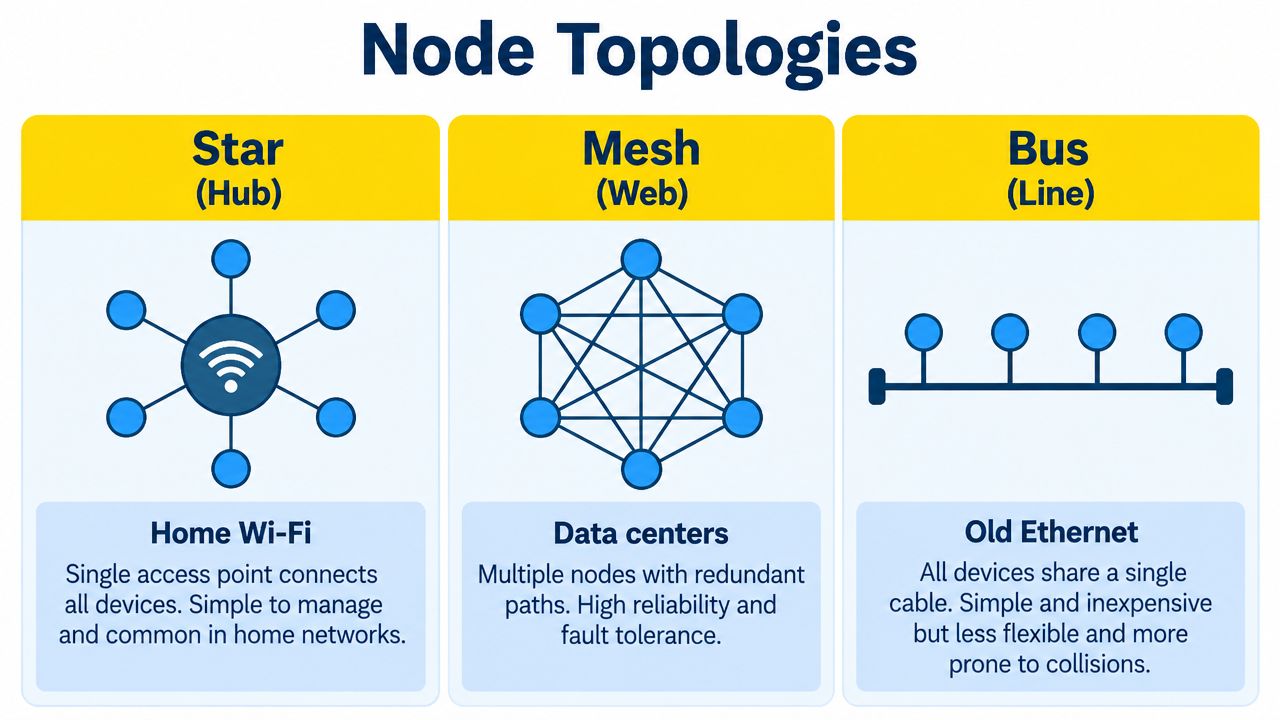
Topology is the shape of a network's connections. It answers a practical question: which nodes can talk directly, and which nodes must pass information through another participant?
In a home, the arrangement usually feels like a star. Your phone, laptop, television, and speaker connect to a central wireless access point or router. If your laptop sends data to an Internet service, the traffic may travel from the laptop to the access point, through the router, and onward to other networks. Each intermediate step is a hop, the router is often the local gateway, and the time required for the exchange contributes to latency.
From one central point to many paths
Data centers need a different balance. A leaf-and-spine design gives servers multiple paths through switching infrastructure, so a single failed link or switch doesn't necessarily isolate an entire group of machines. This kind of redundancy supports east-west traffic, meaning communication between services inside the environment, rather than only traffic entering or leaving the facility.
Older shared Ethernet arrangements used a bus-like idea, where multiple devices shared a common communication path. Modern networks more often use switched connections, but the comparison remains useful because it shows how topology affects failure behavior, contention, and troubleshooting.
Blockchain networks use a peer-to-peer web rather than one central access point. A full node connects to several peers, receives a new transaction or block, and relays it onward. Those peers repeat the process until information has propagated through much of the network.
A node's location and peer selection affect how quickly it hears new information, but receiving a message isn't the same as final agreement. Validation and consensus rules still determine what the network accepts.
Geography, link quality, and the number and variety of peers can influence propagation delay. A node with poorly chosen connections may hear updates later or receive an incomplete view of its peers. The peer-to-peer cryptocurrency explanation gives useful context for understanding why direct peer participation matters.
The following video offers a visual introduction to how connected participants exchange information:
Security and Privacy Considerations for Node Operators
Running a node gives you more control, but it also gives the network a service that must be protected. The exposure depends on the role. A private light client has a different attack surface from a publicly reachable full node or a validator holding signing keys.
Open ports can be discovered and tested by scanners. Peers may also observe the public IP address used for communication, which can reveal network information even when the node's ledger data is public by design. A node that accepts large amounts of traffic may face bandwidth or storage exhaustion attempts.
Common ways operators get isolated or overwhelmed
An eclipse attack attempts to surround a node with connections controlled by an attacker. If successful, the node may see a distorted view of network activity because it has been separated from honest peers. A Sybil attack uses many apparently separate identities to influence peer selection or flood a participant with connections.
The risk isn't limited to blockchain. Ordinary network services can also suffer from weak authentication, unpatched software, exposed administration interfaces, or overly broad firewall rules. Security starts with understanding which services your node needs to expose.
Match protection to the role
Use a focused checklist rather than turning on every possible tool:
- Limit exposure: Allow only the ports and services required by the node, and use a host firewall to restrict administrative access.
- Protect privacy: Consider VPN or Tor where the software and network rules support it, especially if hiding the node's public network location matters.
- Diversify peers: Avoid depending on a narrow set of peers. Use documented peer controls and monitor unexpected connection patterns.
- Control resource use: Apply rate limits and storage protections so incoming activity can't consume all available capacity.
- Patch consistently: Keep the operating system, node software, wallet tools, and dependencies updated from trusted sources.
- Separate keys: Keep validator or signing keys away from routine wallet activity, and protect backups from unauthorized access.
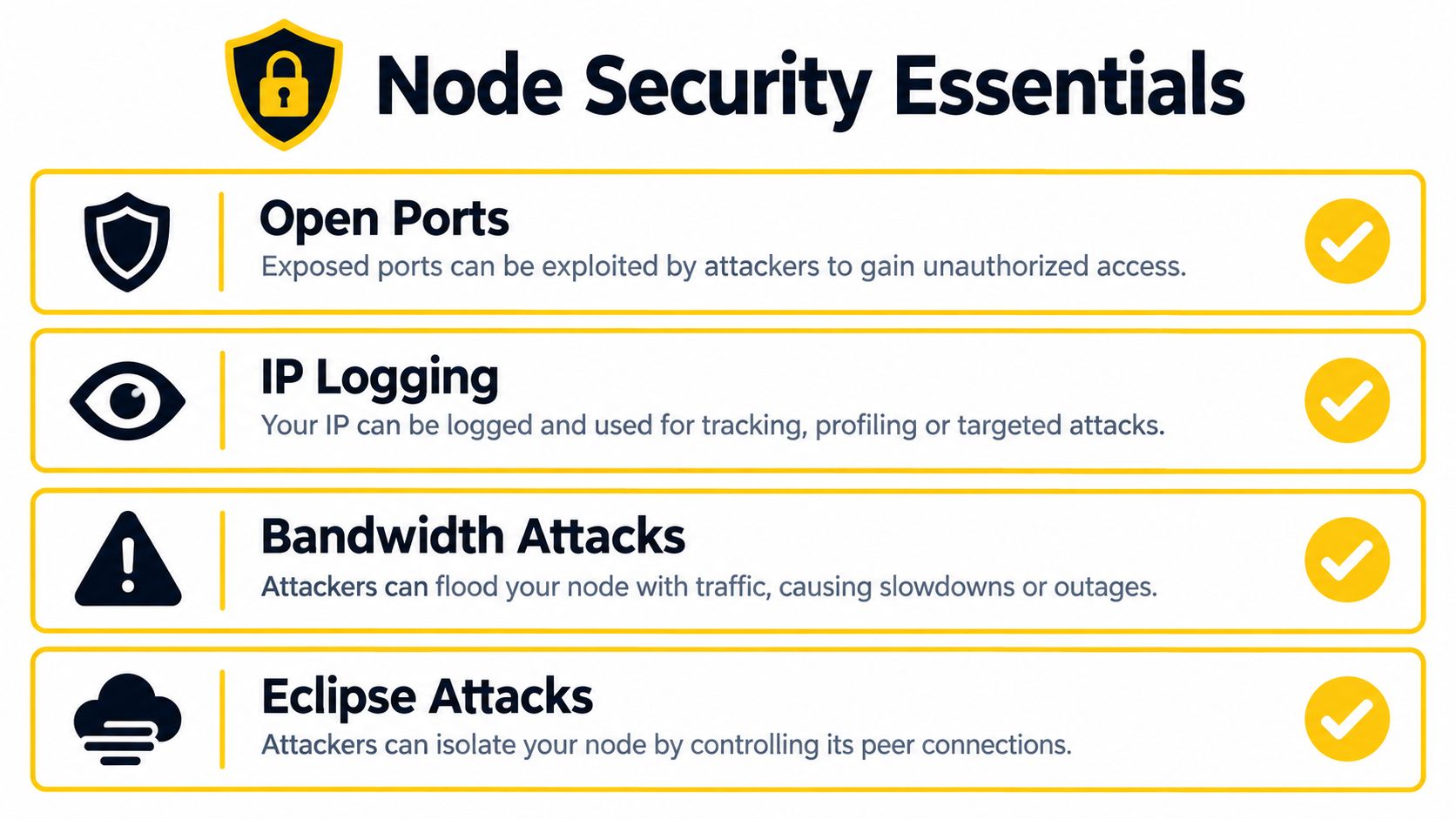
Good node hygiene is ongoing. Review logs, check disk and bandwidth consumption, test backups, and confirm that software updates haven't changed the required configuration. A secure setup today can become a weak setup later if nobody maintains it.
Running or Contributing a Node in Practice
You don't need to begin with the most demanding role. Start by deciding whether you want to use a network, verify it independently, or help operate it. Those goals lead to different node choices.
Choose a starting level
A browser-based or light wallet is a gentle entry point. It lets you transact without keeping the full ledger locally, although you rely more heavily on remote infrastructure. This can help you learn the user experience before managing software and storage yourself.
A full node requires more preparation. Choose hardware with enough storage for the chain, stable network access, a firewall, and a backup plan. A small home computer or VPS may work if the network's documented requirements fit the available resources. Don't assume that a device is suitable until you've checked the project's current documentation.
The general setup looks like this:
- Download trusted software: Use the project's official documentation and verify the release where verification instructions are available.
- Create a separate data location: Keep chain data distinct from personal files, and monitor free storage.
- Configure access carefully: Allow only the documented peer traffic, and avoid exposing administration services directly to the public Internet.
- Start synchronization: Let the node obtain and verify network data. Initial synchronization can take time, depending on the chain and your connection.
- Watch its health: Check logs, peer connections, storage, memory, and bandwidth. A node that is running but not synchronized isn't contributing reliably.
- Back up safely: Protect wallet keys and configuration secrets separately from ordinary chain data. Test that your recovery process works.
Move from learning to contribution
Once a node is stable, you can explore relaying, mining, or validation if the protocol supports those roles. Each step adds responsibility. A relay node needs dependable connectivity, a miner needs suitable equipment and power management, and a validator needs especially careful key protection and uptime planning.
Command-line tools can make status checks and troubleshooting more precise. The Bitcoin CLI commands tutorial provides a practical example of how operators interact with node software from a terminal.
Cascoin offers downloadable wallets, a public mining pool, open-source software, and local node participation for people who want to explore a smaller community-driven network. Its documentation describes syncing the chain locally, validating data, and mining as distinct ways to participate, so treat it as a learning option rather than an automatic investment opportunity.
Running a node can teach you how discovery, synchronization, validation, storage, and peer communication work together. It also contributes a privately operated connection point that other participants may use, provided you maintain it responsibly.
Bringing It All Together and Choosing Your Path
Nodes are the basic actors in every network conversation. A Wi-Fi router forwards traffic, a laptop requests services, a server responds, and a blockchain peer validates or relays shared data. The hardware and software differ, but each node has an identity, a role, and capabilities that let it participate.
Your best starting point depends on what you want to learn and what you can maintain:
- Choose a light client if you mainly want to transact with minimal setup and can accept greater reliance on external peers.
- Run a full node if you want independent verification, stronger control over your network view, or practical experience with synchronization and validation.
- Explore relay or validator duties if you have stable connectivity, understand the protocol's requirements, and can protect keys and monitor the service.
- Consider mining only after checking the algorithm, hardware, operating cost, and current project documentation.
Hosted services are convenient, but they hide much of the network's behavior. Operating your own node exposes those mechanics directly. That doesn't guarantee financial returns, and node economics should be evaluated separately from the technical value of learning and contributing.
Understanding nodes changes your position from passive network consumer to informed participant. You can choose whether to observe, verify, relay, validate, or mine, then take responsibility for the role you select.
If you want a practical way to explore blockchain participation, visit Cascoin to review its open-source software, wallet options, mining paths, and node documentation. Start with local synchronization and verification, then add deeper responsibilities only when you're comfortable maintaining the software and protecting your keys.